What makes a testbench useful?
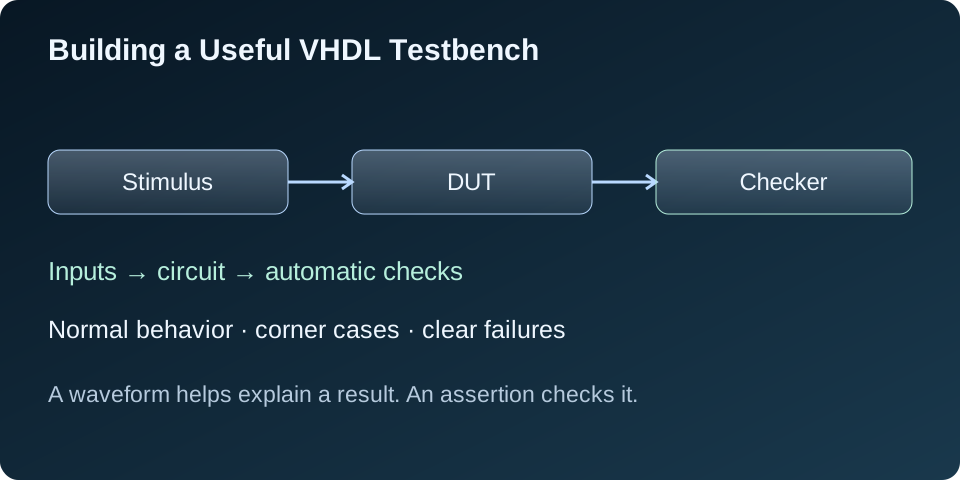
A waveform can show that a design is doing something. A useful testbench tells me whether it is doing the right thing. It supplies inputs, checks the outputs against an expectation, and reports a clear failure when the behavior is wrong.
I start with a small set of written requirements. Then I turn each requirement into a check. This keeps the test focused on the behavior I need, rather than on the way I happened to write the RTL.
The design under test, or DUT, is the circuit being checked. The testbench surrounds it with a clock, reset, stimulus, and checking logic. The waiting and reporting code in this article is simulation code; it is not intended to become hardware.
Start with a small, clear specification
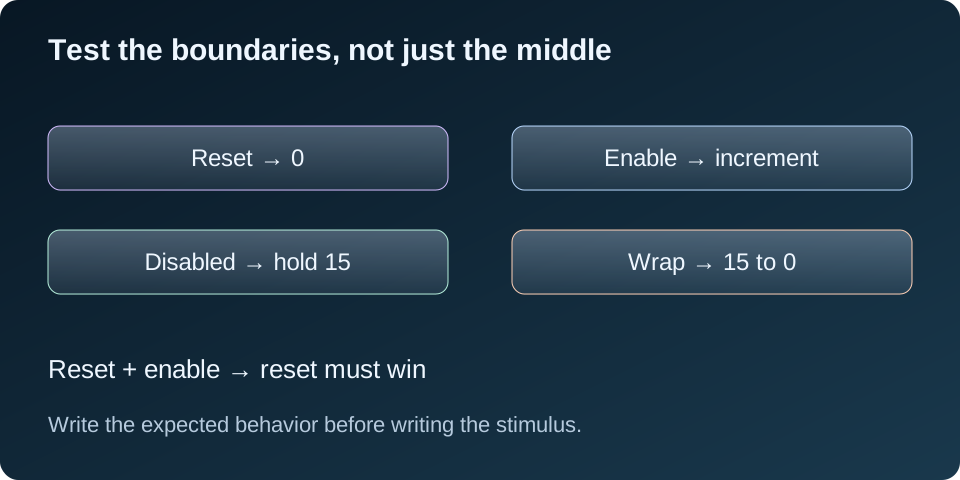
For this example, I use a four-bit unsigned counter. Its contract is:
- Update on the rising clock edge.
- A synchronous active-high reset sets the count to zero.
- Reset has priority over enable.
- With enable high, increment by one.
- With enable low, keep the previous value.
- After 15, wrap to zero.
These rules give me an exact expected answer at every checked edge. They also identify the important boundaries: zero, maximum count, wraparound, and competing reset and enable.
The example circuit
I use numeric_std for unsigned arithmetic. The four-bit result naturally wraps when incremented beyond 15. The initializer gives this teaching example a known starting value; the test still explicitly exercises reset.
library ieee;
use ieee.std_logic_1164.all;
use ieee.numeric_std.all;

entity counter4 is
  port (clk, rst, en : in std_logic;
        q : out unsigned(3 downto 0));
end entity;

architecture rtl of counter4 is
  signal count : unsigned(3 downto 0) := (others => '0');
begin
  process (clk)
  begin
    if rising_edge(clk) then
      if rst = '1' then
        count <= (others => '0');
      elsif en = '1' then
        count <= count + 1;
      end if;
    end if;
  end process;
  q <= count;
end architecture;
Drive and check at deliberate times
I drive reset and enable on the falling edge, then let the DUT sample them on the following rising edge. That avoids changing the inputs at the same instant the DUT samples them.
VHDL signal assignments do not update every connected signal immediately within the same process execution. They are scheduled, and connected logic can require additional delta cycles to settle. A checker that runs immediately after rising_edge(clk) may therefore read the previous output.
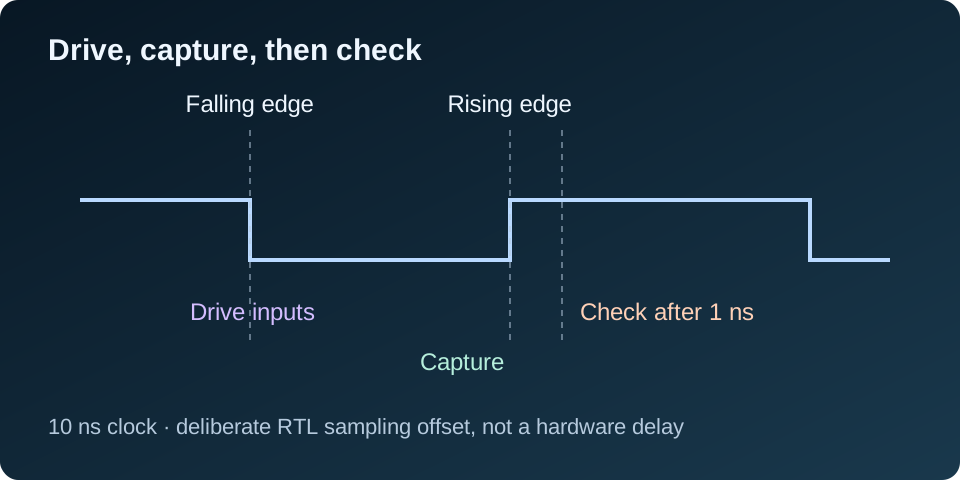
Here I wait 1 ns after the rising edge before checking. With a 10 ns period, that leaves ample space before the next edge and allows the registered output and its connection to settle. It is a testbench sampling choice, not an inserted hardware delay or a timing-closure technique. A larger verification environment should define its sampling convention for the actual interface; one wait for 0 ns is not guaranteed to settle an arbitrary chain of signal assignments.
A complete self-checking testbench
The step procedure applies one input combination, waits for the result, and compares it with an explicitly supplied expected value. Reusing this small procedure keeps the sequence readable without hiding the test’s intent.
library ieee;
use ieee.std_logic_1164.all;
use ieee.numeric_std.all;
use std.env.all;

entity tb_counter4 is
end entity;

architecture sim of tb_counter4 is
  constant PERIOD : time := 10 ns;
  signal clk : std_logic := '0';
  signal rst : std_logic := '1';
  signal en  : std_logic := '0';
  signal q   : unsigned(3 downto 0);
begin
  clk <= not clk after PERIOD / 2;
  dut : entity work.counter4
    port map (clk => clk, rst => rst, en => en, q => q);

  stimulus : process
    variable checks : natural := 0;
    procedure step (
      constant reset_value, enable_value : std_logic;
      constant expected : natural;
      constant label_text : string) is
    begin
      wait until falling_edge(clk);
      rst <= reset_value;
      en  <= enable_value;
      wait until rising_edge(clk);
      -- Let registered and connected outputs settle in this RTL example.
      wait for 1 ns;
      checks := checks + 1;
      assert q = to_unsigned(expected, q'length)
        report label_text & ": expected " & integer'image(expected) &
               ", got 0x" & to_hstring(q) &
               " at " & time'image(now)
        severity failure;
    end procedure;
  begin
    step('1', '0', 0, "reset clears count");
    step('0', '0', 0, "disabled after reset");
    for i in 1 to 15 loop
      step('0', '1', i, "count sequence");
    end loop;
    step('0', '0', 15, "hold maximum");
    step('0', '0', 15, "hold maximum again");
    step('0', '1', 0, "wrap 15 to 0");
    step('0', '1', 1, "count after wrap");
    step('1', '1', 0, "reset wins over enable");
    step('1', '0', 0, "reset remains active");
    step('0', '0', 0, "hold after second reset");
    step('0', '1', 1, "restart counting");
    report "PASS: " & integer'image(checks) & " checks" severity note;
    finish;
    wait;
  end process;

  watchdog : process
  begin
    wait for 1 us;
    assert false report "TIMEOUT: test did not finish" severity failure;
    wait;
  end process;
end architecture;
The expected sequence is expressed as integers from the specification. The checker does not read internal DUT registers or copy the DUT’s RTL into a second implementation. For larger arithmetic blocks, I would use a separate reference calculation or known reference vectors and account for the output latency.
The watchdog turns a hung test into a failure. The test reports success only after all checks complete, then calls the VHDL-2008 finish procedure. A timeout or an externally imposed stop time should not be treated as a passing test.
Write assertions that explain the failure
An assertion checks whether its condition is true. When it is false, the report message is printed and the severity tells the simulator how to handle it. I include the test case, expected value, actual value, and time so the first message is useful without opening a waveform.
wrap 15 to 0: expected 0, got 0xF at 206000000 fsThis is an example of a diagnostic message, not the output of the correct circuit. The actual value is shown in hexadecimal so unknown values can remain visible instead of being hidden by an integer conversion. The exact timestamp formatting depends on the simulator.
I use severity failure for a broken functional expectation and severity note for the final pass message. Simulator stop policies are configurable, so the run command is part of the test setup too.
Run it and look for an explicit pass
Save both downloaded files in one directory. With GHDL installed, run:
ghdl -a --std=08 counter4.vhd tb_counter4.vhd
ghdl -e --std=08 tb_counter4
ghdl -r --std=08 tb_counter4 --assert-level=error --wave=counter.ghw
The first command analyzes the source files, the second elaborates the testbench, and the third runs it. The VHDL-2008 setting is needed for the features used here. The waveform file is available if a check needs investigation.
The example was run with GHDL and completed 25 checks at 256 ns. Its final report is:
PASS: 25 checks
simulation finished @256ns
I also check the simulator’s exit status in an automated run. A printed pass message should never override an earlier failure.
When a check fails, investigate the first mismatch
I begin with the first failure rather than the last waveform symptom. One incorrect value can cause many later mismatches.
- Read the case label. Does the failure concern reset, hold, increment, or wrap?
- Recheck the specification. Confirm reset priority and the edge on which the output should change.
- Check stimulus timing. Make sure inputs were applied before the intended sampling edge.
- Check the checker. An incorrect expectation or an early sample can fail a correct design.
- Inspect a small waveform interval. Compare clock, reset, enable, and output around the first mismatch.
- Keep the reproducing case. After the fix, rerun it with the rest of the tests.
I do not change the expected answer just to make the test pass. If the requirement changes, I update the specification and the checks together.
Corner cases and the next level of verification
This small counter has a short state range, so the test can visit every count value. Larger blocks need a deliberate coverage plan. For a FIFO, I would check empty, full, simultaneous read/write, reset, and boundary transitions. For a video pipeline, I would check frame boundaries, valid gaps, and alignment between pixels and control signals.
For a variable-latency interface, I would use a scoreboard: store expected transactions and compare them when the interface says the outputs are valid. Checking a fixed number of cycles later is only correct when the latency is actually fixed. Backpressure and response timeouts also need explicit expectations.
Random stimulus can broaden the combinations, but it still needs a trustworthy checker and a recorded seed so a failure can be reproduced. Directed corner cases remain useful even when random tests are added.
A passing RTL test shows that the exercised behavior matched the checks. It does not prove timing closure, metastability safety, or correct operation on the board. I keep functional simulation, CDC review, implementation timing, and hardware validation as complementary parts of the work.
Further reading
The official GHDL simulation quick start explains the analyze, elaborate, and run flow. The GHDL runtime documentation covers assertion stop levels and simulation controls.