Project demonstration
An automatic browser demonstration of the project concept.
Browser demonstration with synthetic inputs; not a recording of FPGA hardware.
Why build a logic analyzer inside the FPGA?
A digital signal is easier to understand when I can see how it changes over time. A logic analyzer records those changes so I can inspect a sequence, compare signals, and identify where an event begins.
In this hobby project, I built a self-contained analyzer for the original Zybo Rev B with an XC7Z010 FPGA. It generates its own UART traffic, records four internal signals, decodes the serial data, and draws the result on a 1280 × 720 HDMI display.
The internal demonstration keeps the first version manageable. It provides a known input sequence and does not need an external signal generator or probe connection. The design is an internal capture-and-display tool, rather than a general-purpose external logic analyzer.
What the display shows
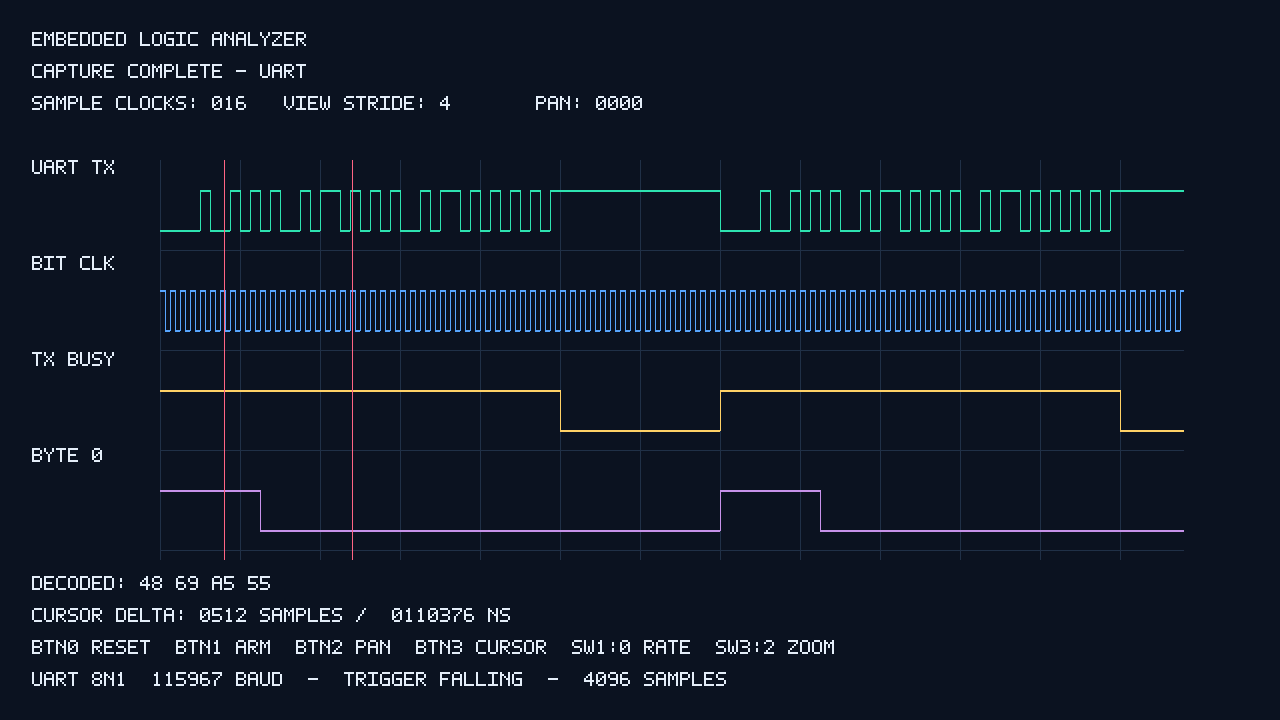
The opening image was generated by the project’s VHDL renderer testbench. It shows the display produced in simulation; it is not a photograph of a monitor connected to the board.
The four traces give different views of the same transmission:
- UART TX: the serial data line, including start, data, and stop bits.
- BIT CLK: a reference that is high during the first half of each UART bit period.
- TX BUSY: a marker covering the four-byte transmission burst.
- BYTE 0: a marker identifying the first byte of the burst.
The bottom of the display shows decoded hexadecimal bytes and the cursor separation in samples and nanoseconds. The sample divider, viewing stride, and pan position appear at the top.
A known UART sequence makes the checks clearer
The generator repeatedly sends 48 69 A5 55 in hexadecimal. The first two bytes represent “H” and “i”; the other two provide useful bit patterns for inspecting transitions.
The serial format is 8N1: one start bit, eight data bits, no parity, and one stop bit. Data bits are sent least significant bit first. The line is high while idle and falls at the start bit, giving the analyzer a useful trigger event.
The generator uses 640 pixel-clock cycles per UART bit. With the project’s 74.21875 MHz pixel clock, that gives approximately 115,967 baud. It is intentionally close to 115,200 baud, rather than exactly equal to it. The chosen relationship gives an integer number of samples per bit at every supported sampling rate.
Trigger, record, then freeze
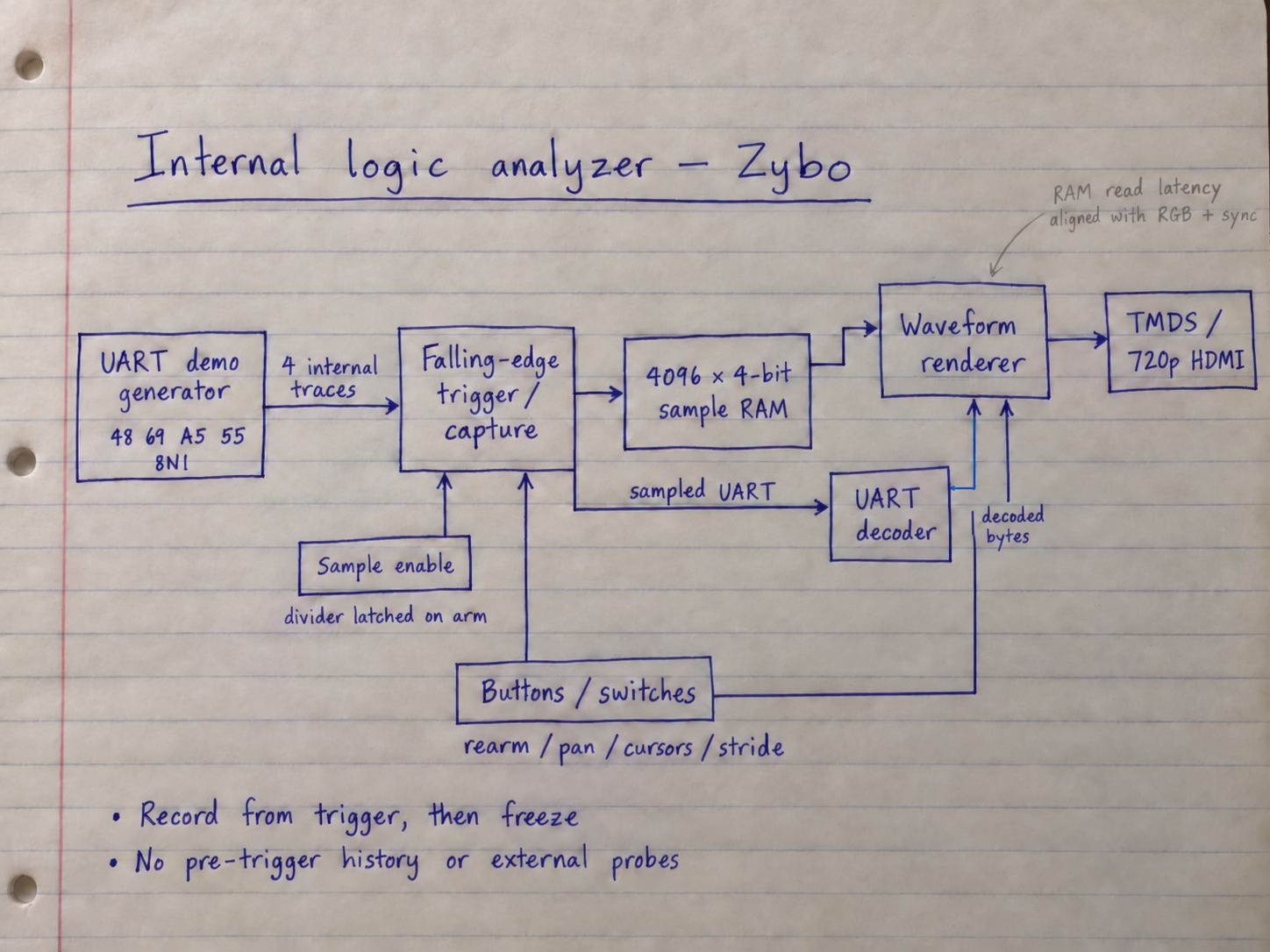
After arming, the analyzer waits for a falling edge on the UART channel. It stores that trigger sample at address zero, records all 4,096 samples, and freezes the completed recording for inspection.
Each sample contains four bits, one for each trace. The 4,096 × 4-bit recording fits in one RAMB18 block. There is no pre-trigger history in this version: the recording begins at the trigger rather than showing events before it.
The UART decoder receives the sampled UART values, checks the start-bit center, samples each data bit near its center, and validates the stop bit. It retains the first eight valid decoded bytes and a framing-error indication. It decodes the sampled data rather than simply displaying the generator’s expected byte sequence.
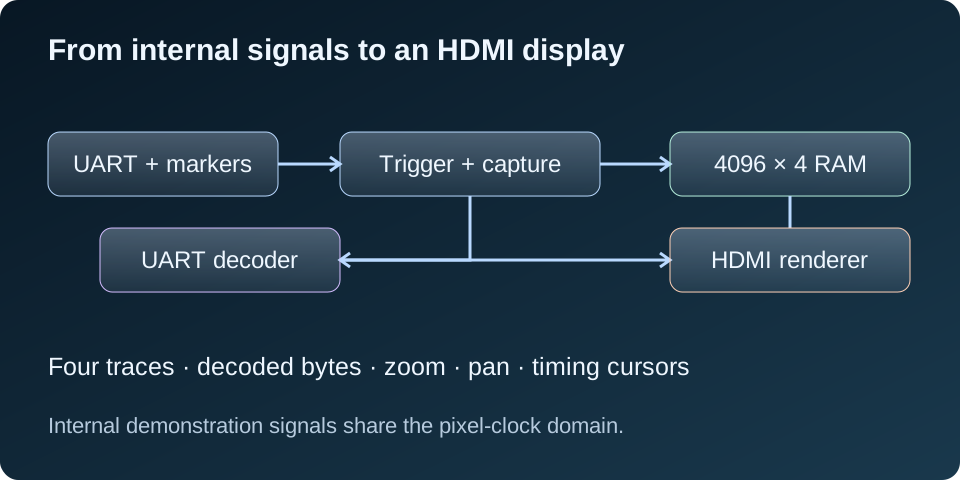
Notebook architecture
Sampling rate trades detail for recording time
The recording depth stays fixed. Sampling faster gives more detail but covers a shorter interval. Sampling more slowly covers a longer interval with fewer observations of each UART bit.
| SW1:0 | Sample rate | Samples / bit | Recording duration |
|---|---|---|---|
| 00 | 4.638672 MHz | 40 | 0.883 ms |
| 01 | 2.319336 MHz | 20 | 1.766 ms |
| 10 | 1.159668 MHz | 10 | 3.532 ms |
| 11 | 579.834 kHz | 5 | 7.064 ms |
The sampling-rate selection is latched on arm or reset. This prevents a switch change from altering the time base halfway through a capture. The logic remains in one pixel-clock domain; a sample enable controls when a sample is recorded.
Inspecting the recording
The onboard controls let me inspect the capture without a processor application:
- BTN0: reset and start a new capture after release.
- BTN1: rearm, latch the sampling rate, and restart the UART demonstration.
- BTN2: pan forward by 256 samples, wrapping at the end of the valid view.
- BTN3: change the distance between the timing cursors.
- SW3:2: select four, two, or one sample per screen pixel.
The buttons are synchronized and debounced, so a held button produces one action. At wider views, each screen pixel selects one sample; it does not summarize every transition in the skipped samples. I zoom in when inspecting narrow pulses.
At the fastest sampling rate, one sample represents about 215.579 ns. A cursor separation of 512 samples therefore represents approximately 110,376 ns after integer rounding. The cursor readout uses the recording’s sample interval, not the HDMI screen refresh period.
The display has its own timing requirements
Reading the block RAM takes one clock cycle. The renderer accounts for that latency when aligning the requested sample, waveform position, RGB output, and synchronization signals. An off-by-one delay here can shift a trace even when the stored recording is correct.
The design also avoids resetting the sample memory, which supports block RAM inference. Its contents stay hidden until a complete capture is available. Reset and rearm invalidate the previous recording rather than relying on the RAM to be cleared.
Video output reuses the existing 720p timing and TMDS transmitter modules. It sends DVI-compatible video over HDMI at approximately 59.975 frames per second. This version does not provide HDMI audio or EDID negotiation, so the connected monitor must accept its fixed video mode.
What has been verified so far?
The repository records ten passing GHDL/VUnit analyzer tests and successful GHDL synthesis of the four portable modules. The tests cover trigger behavior, sample gating, capture depth, stored sample ordering, frozen recordings, rearm/reset, UART decoding errors, all four sample rates, and renderer alignment.
The saved Vivado 2024.1 implementation targets xc7z010clg400-1. The documented results are:
- Successful synthesis, placement, routing, and bitstream generation.
- Routed setup slack of +0.500 ns and hold slack of +0.122 ns, with no failing endpoints.
- 1,024 LUTs, 321 registers, one RAMB18, and three DSPs; the DSP use comes from the reused TMDS encoders.
The saved checks are not completely warning-free. The documentation lists 12 DRC warnings involving TMDS DSP input pipelining, the programmable-logic-only PS7 configuration, and asynchronous reset-related RAM controls. A clock-lock reset invalidates the recording, and the display waits for a new complete capture. These warnings remain part of the implementation review.
These are existing repository results; no fresh simulation or implementation run was performed for this website update. Operation with a connected Zybo board and HDMI monitor still needs hardware testing.
What is needed for the first hardware test?
The intended setup needs the original Zybo Rev B, power, USB JTAG for programming, and an HDMI cable connected to a compatible monitor. No external UART device is required for this internal demonstration, and no processor software is needed.
The bitstream and pin assignments target the original Zybo, not the Zybo Z7. After programming with the switches initially off, the design is intended to capture automatically and show the decoded sequence 48 69 A5 55. That remains an expected result until confirmed on the physical setup.
The first board checks should confirm the display mode, automatic capture, decoded bytes, LED status, and all controls. I would then compare timing-cursor values at the different sample rates and check repeated reset and rearm behavior.
Where the project can grow
Possible extensions include a pre-trigger buffer, more channels, additional trigger conditions, SPI decoding, and exporting captured samples to a computer. These are future ideas, not implemented features of this version.
External signal capture would also need a suitable input interface, correct voltage levels, and a deliberate sampling and clock-domain-crossing strategy. The present demonstration uses internal synchronous signals and does not establish a general external measurement bandwidth.
The useful lesson is how the pieces work together: a known stimulus, a repeatable trigger, stored samples, actual protocol decoding, and a readable display. Each part has clear behavior that can be tested before moving to the board.