When you first use a Zynq board, one question comes up quickly: should this part of my project run on the processor, or should I build it in the FPGA? Understanding the two sides makes that choice much easier.
PS and PL in simple words
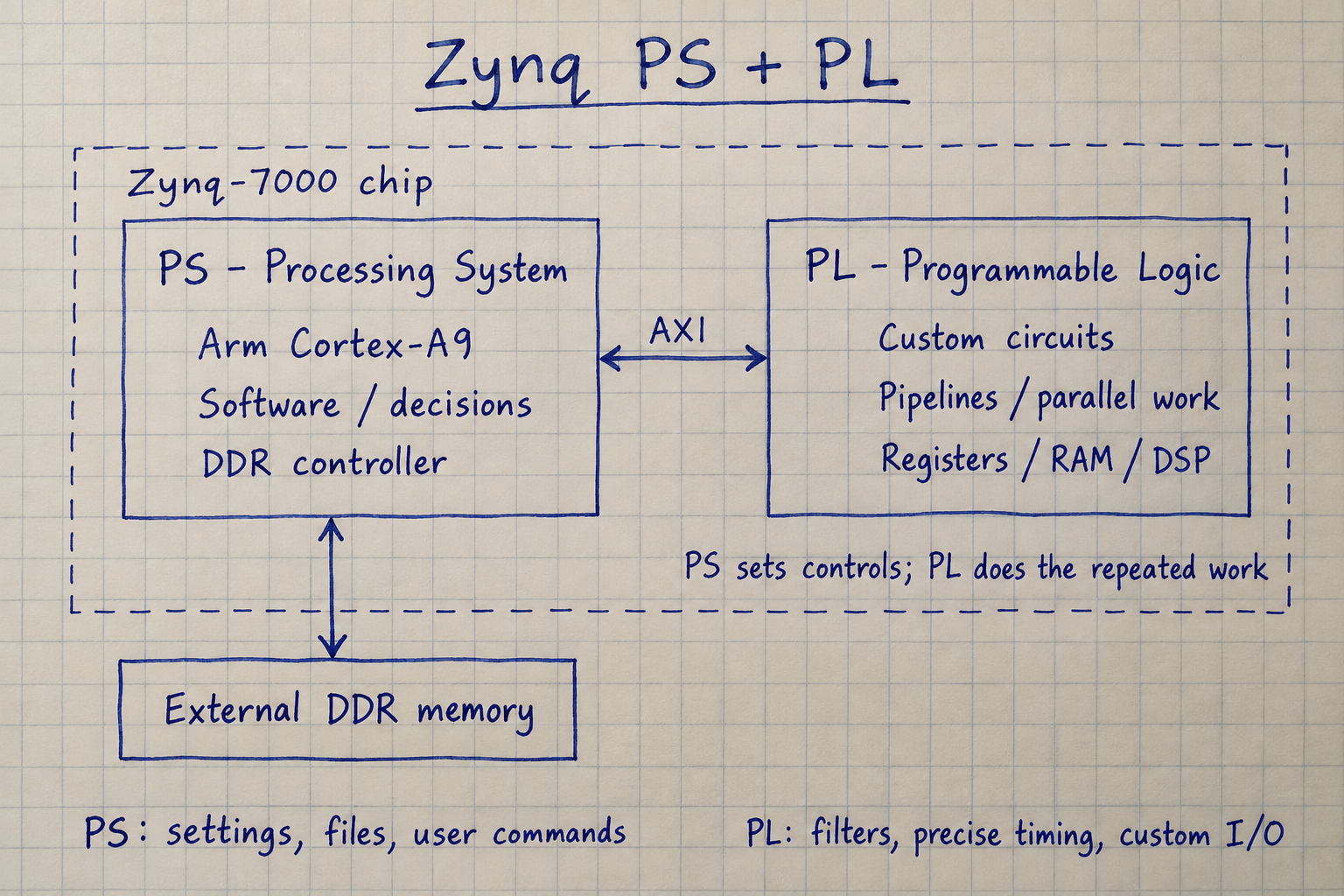
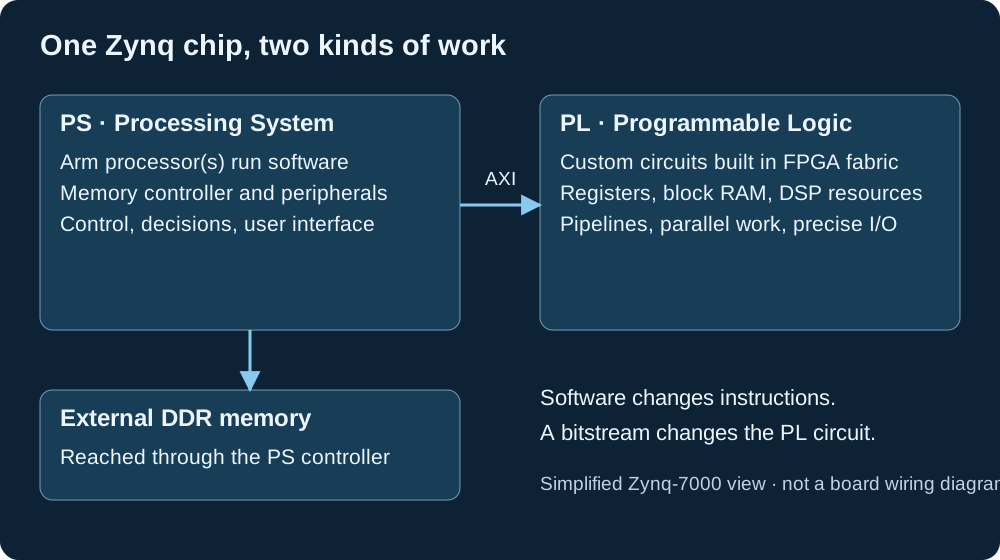
A Zynq device puts a processor and FPGA logic in the same chip. PS means Processing System. It contains the processors and built-in hardware such as memory controllers and peripherals. PL means Programmable Logic. It is the FPGA area where you build your own digital circuits.
Think of a small workshop: the PS follows instructions and decides what to do next. The PL is a machine built for a particular job. Software can change the machine’s settings without rebuilding its circuit.
This article uses Zynq-7000, the family used on Zybo, as its example. Its PS uses Arm Cortex-A9 processors; other Zynq families have different processors and interfaces. AMD describes the two sides in its Zynq-7000 Processing System overview.
What belongs in the PS?
The PS runs programs, often written in C or C++. Those programs may run directly on the processor, under a real-time operating system, or under Linux.
Software is a good starting point for configuration, user commands, file handling, network protocols, and algorithms with many changing decisions. A menu, for example, does not usually need a custom hardware circuit.
The PS includes fixed hardware too. Using a built-in UART or Ethernet controller is not the same as making the CPU generate every electrical signal itself. Software configures and uses those peripherals.
A useful first step is to build a correct software version and measure it. If it already meets your requirements, keeping it in software may save development time.
What belongs in the PL?
The PL implements circuits: counters, state machines, filters, custom interfaces, and arithmetic pipelines. You can describe them in VHDL or Verilog/SystemVerilog, connect existing IP blocks, or use high-level synthesis to generate hardware from suitable code.
Consider a pixel filter with three stages. While one pixel is in the final stage, another can be in the middle stage and a third in the first. Once filled, a suitably designed pipeline can accept a new pixel on each clock cycle. That is different from asking a CPU to execute all the operations for each pixel in sequence.
The PL is useful for repeated calculations, multiple operations in parallel, and interfaces that need precise cycle-by-cycle timing. It costs FPGA resources and requires simulation, timing closure, and integration work. It does not automatically make every algorithm faster.
Partitioning means choosing who does each job
Hardware/software partitioning means dividing the application into tasks and assigning each task to the PS, the PL, or a combination of both.
| Task | Starting choice | Reason |
|---|---|---|
| User menu and settings | PS | Easy to change in software |
| Repeated pixel arithmetic | PL candidate | Can use a parallel pipeline |
| File saving and logging | PS | Software libraries handle this well |
| Precisely timed custom signals | PL candidate | Clocked logic gives direct timing control |
| Small, occasional calculation | PS first | Transfer overhead may exceed the benefit |
| Buffer and completion management | PS + PL | Both sides need a shared contract |
Ask four questions: How much data arrives? How soon must a result be ready? Can the work run in parallel? How much does it cost to move data between the two sides?
How do the PS and PL talk?
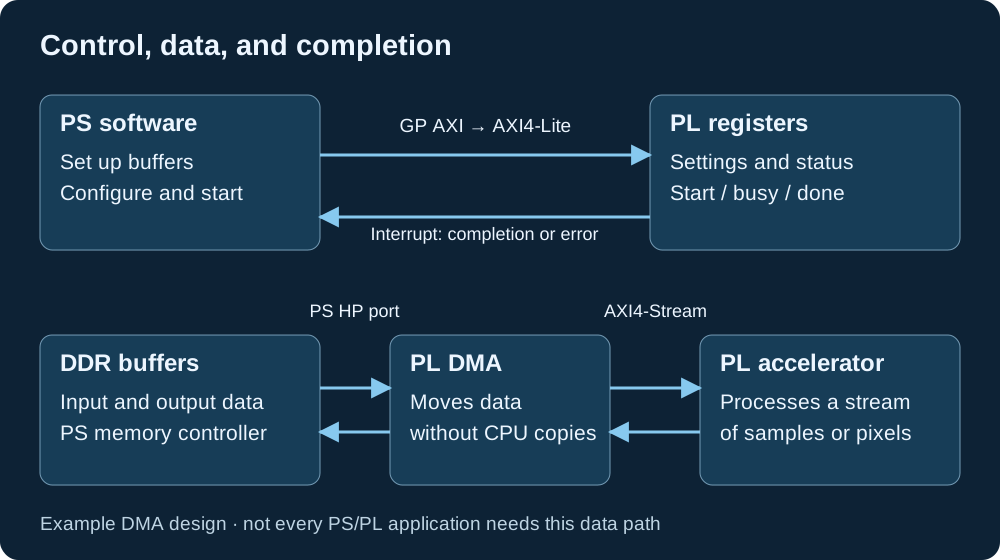
They commonly communicate through AXI, a family of interfaces. It helps to separate three jobs: changing settings, moving data, and reporting completion.
Settings: software reads and writes addresses mapped to PL registers. In a typical Zynq-7000 design, a PS general-purpose AXI master connects through interconnect logic to AXI4-Lite control registers in the PL. A register might hold a filter threshold; another might report whether processing is busy.
Data: larger buffers can use a DMA engine. DMA means Direct Memory Access: hardware moves a block of data without the CPU copying every item. A PL AXI DMA engine can access DDR through a PS high-performance (HP) port and exchange streams with a PL accelerator. AXI4-Stream carries a sequence of data items; it is not itself a CPU-addressed memory interface.
Completion: the PL can raise an interrupt so software knows that a result or error needs attention. For a simple first design, software can also poll a status register.
For the actual Zynq-7000 ports and their capabilities, see AMD’s PS–PL AXI interface documentation.
A simple example: an image filter
Suppose an application takes an image, applies a filter, and saves the result. One possible split is to let software load the image and choose the settings, while a PL pipeline performs the repeated pixel calculations.
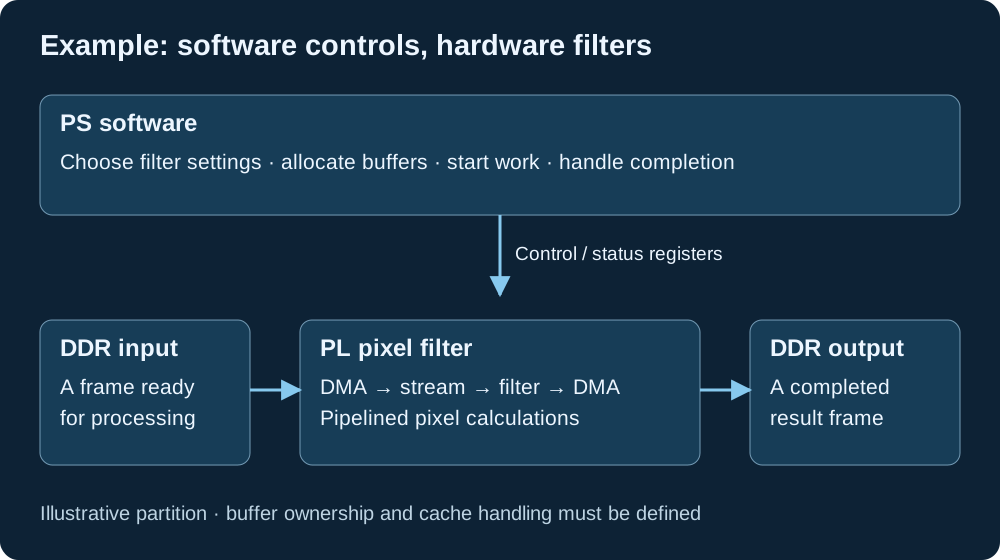
- The PS prepares the input and output buffers and gives the hardware their addresses and sizes.
- The PS sets the filter registers and starts the transfers.
- DMA feeds the PL filter. The filter processes accepted pixels and sends its results to the output transfer.
- The hardware reports completion or an error. Software checks the status before using or saving the output.
The design must arrange the output side to be ready before input can overrun it. A stream may pause when downstream hardware cannot accept data; the filter must respect that flow control.
A direct sensor-to-filter-to-display pipeline can avoid DDR for some stages. Use frame buffers when the application needs them, rather than adding memory transfers to every design.
The connection needs as much care as the calculation
Define buffer ownership. If hardware is writing a buffer, software should not treat it as a completed result. Agree on when each side may read, write, and reuse it.
Handle caches correctly. The CPU may have a cached copy of memory that differs from DDR. Zynq-7000 HP transfers do not automatically make those CPU caches coherent. Use the platform’s DMA mapping and synchronization APIs; bare-metal code may need cache cleaning or invalidation at the correct ownership transitions. The ACP offers a different, potentially coherent path when configured correctly. AMD discusses these alternatives in its HP DMA guidance and ACP DMA guidance.
Agree on the interface. Document addresses, register meanings, buffer lengths, data layout, and what “done” actually guarantees. Define timeouts and recovery after errors.
Plan clocks and resets. The CPU and custom logic may use different clocks. Use suitable clock-crossing interfaces, and decide what happens to an active transfer if one side resets. See my articles on clock-domain crossings and reset design.
Measure the whole application
A fast filter can sit inside a slow system. Total time includes preparing data, moving it to the hardware, running the calculation, returning the result, and handling completion. Some designs overlap these steps, but the transfer and setup costs still matter.
For a tiny job, software may finish before a hardware transfer is even set up. For a long stream, a pipeline may keep running efficiently while the PS does other work. Measure the real workload, including memory traffic and software overhead.
Check correctness first. Compare hardware output with a trusted reference, test pauses and resets, then measure end-to-end throughput and latency. The examples here illustrate design choices; they do not claim a particular speedup.
A practical first PS/PL project
Start with a small PL block that exposes a control register and a readable result, such as a counter. Write software that changes a setting and checks the result. This teaches address mapping, clocks, reset, and register access without a complex data path.
Next, try an interrupt. Add DMA only when the application needs bulk transfers, and test it with a small known buffer before adding a filter.
A good partition lets the PS handle flexible decisions and the PL handle the work that benefits from a custom circuit. The shared interface makes those two parts behave as one system.